



Independent comparison · Updated Aug 2026

A BrantSteele Hunger Games Simulator alternative

If you like the BrantSteele Hunger Games Simulator but want a faster path from a list of names to a custom arena, this independent browser tool focuses on batch cast setup. Paste 8-48 names, add pictures only when they matter, tune optional attributes, and run the story on mobile or desktop.

This is not a mirror, replacement account, or official BrantSteele page. It is a separate fan-made simulator with a different setup workflow.

Your arena
Cast ready · attributes optional
8-48
Custom tribute 1
STR 7 · SPD 5
Custom tribute 2
INT 8 · SUR 6
Custom tribute 3
Balanced build
Paste names
Batch pictures
8-48 tributes
Names first
Mobile + desktop
Modern browser
Four attributes
Optional tuning
No signup
For a free run
See the workflow

From a blank roster to your own arena

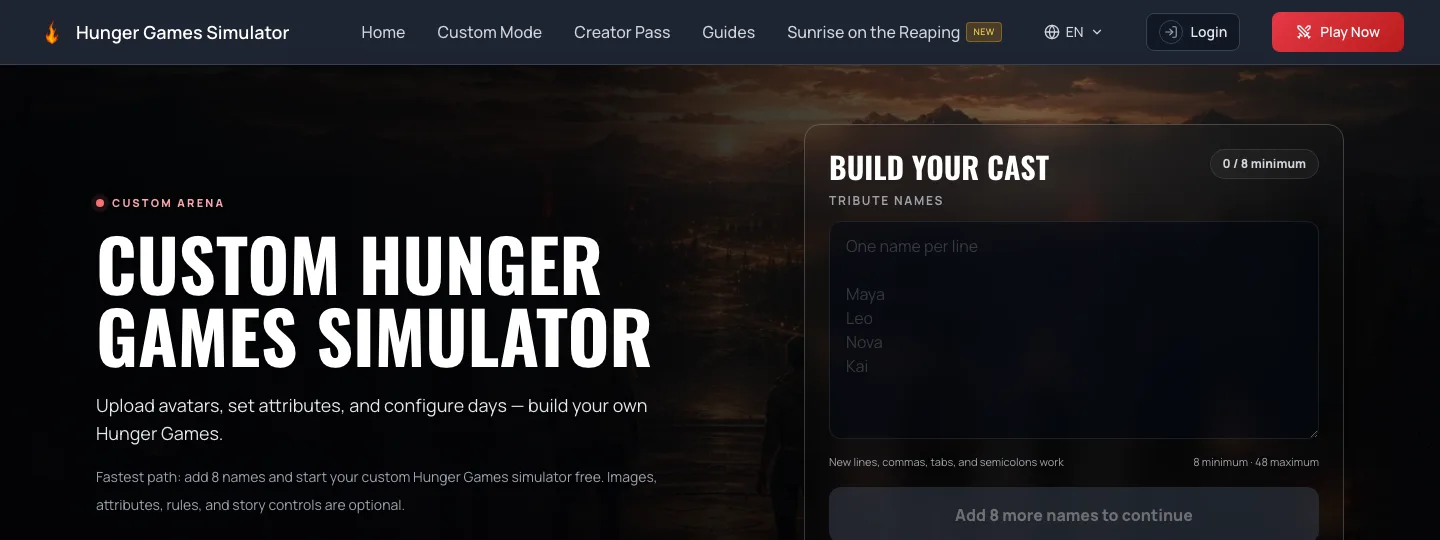
This BrantSteele Hunger Games Simulator alternative keeps the first screen focused on the cast. Paste names, add optional images or imports, then move into the arena only when the roster is ready.

Custom Hunger Games Simulator cast builder with name entry and image controls
The real Custom Mode opening screen: names are the only required starting point; images, imports and deeper controls remain optional.
A custom group looking across the simulator arena
Build the cast first, then let events, alliances and eliminations turn that roster into a complete run.
Quick answer

Is this the right BrantSteele Hunger Games Simulator alternative for you?

Choose this simulator when your main problem is cast setup: you already have a group of names or pictures and want to move into a playable story without a long configuration session. Choose BrantSteele when you specifically want its established saved-season, history, statistics, or classic event workflow. Neither choice has to win every category. The useful question is which workflow matches the run you are trying to create today.

Side-by-side

Compare the workflows, not the logos

The comparison below is intentionally narrow. It covers the actions a custom-cast player can verify today and avoids claims about which simulator is universally better.

FeatureBrantSteeleThis simulator
Core experienceA familiar, text-led arena simulator with classic and updated versions.A custom-cast arena that moves from batch setup into a day-by-day simulation.
Cast setupCreate and edit tributes inside the BrantSteele setup workflow.Paste 8-48 names, then batch-add local pictures or edit only the tributes that need detail.
EventsThe current classic page includes a Modify Events option.Use the built-in event library or add optional custom events to the cast setup.
Character differencesUses its own simulator options and event system.Strength, Speed, Intelligence, and Survival affect event weighting for each tribute.
Saving and historyThe classic page exposes Save, Load Season, History, and Save Statistics.The cast setup stays in the current browser; cloud sync is not promised on this page.
When it fitsUse it when you want the established BrantSteele season and event workflow.Use it when your first job is getting a custom group of names and pictures into a run quickly.

BrantSteele facts above were checked against its current classic interface on August 5, 2026. Because third-party products change, verify the latest options on the official BrantSteele Hunger Games page.

Choose BrantSteele when...

  • You want the familiar classic simulator and its established community workflow.
  • Save, Load Season, History, or Save Statistics is central to the way you run games.
  • You already have a BrantSteele setup and do not need a different cast-building flow.

Choose this simulator when...

  • Your first input is a list of friends, original characters, classmates, or fandom names.
  • You want to paste names or add pictures in batches instead of treating every field as required.
  • You want optional four-stat character differences in a responsive mobile or desktop browser flow.
From list to arena

Build the first run in three decisions

This BrantSteele Hunger Games Simulator alternative keeps the default path short. Every extra control remains optional until it adds something useful to your cast.

01

Paste the cast

Enter one name per line or paste a list from a spreadsheet. Eight valid names are enough to unlock a complete free run.

02

Add the details that matter

Upload optional pictures in batches, then adjust an individual tribute only when a portrait, district, gender, or attribute should differ.

03

Start and follow the story

Choose the pacing, start the arena, and read each day as alliances, hazards, betrayals, and eliminations narrow the field to one winner.

Clear boundaries

Questions before you switch

The short version: this is an independent tool, not a BrantSteele account or importer. Use it for a fresh custom cast when its workflow fits your group.

Is this an official BrantSteele product?

No. Hunger Games Simulator is an independent fan-made project. It is not affiliated with, endorsed by, or operated by BrantSteele, Suzanne Collins, Scholastic, Lionsgate, or The Hunger Games franchise.

Can I import a BrantSteele saved season or code?

Not directly. This page does not promise BrantSteele season-code or saved-link import. Start a new cast by pasting names, then add pictures and attributes only where you want them.

How many custom tributes can I add?

Custom Mode supports 8 to 48 tributes. You can paste names in bulk, keep the balanced defaults, and start without adding a picture to every character.

Do I need an account or download?

No account or download is required for a free custom run. The simulator opens in a modern browser on mobile or desktop, and the cast setup is stored in the current browser.

Can attributes affect what happens?

Yes. Strength, Speed, Intelligence, and Survival feed into the event weighting. You can leave everyone balanced or adjust individual tributes when character differences should influence the run.

Your cast, your run

Ready to try a different setup flow?

If you are comparing the BrantSteele Hunger Games Simulator with a fresh cast builder, open Custom Mode and paste the names you already have. Stop configuring as soon as the cast feels ready; pictures, attributes, events, and story controls can be added later—or skipped entirely.

Build your arena

Independent fan project. Not affiliated with or endorsed by BrantSteele, Suzanne Collins, Scholastic, Lionsgate, or The Hunger Games franchise. All referenced names and trademarks belong to their respective owners.